Reading this article on Swing menus reminded me of how much I love programming in Apple's Cocoa framework
Cocoa is one of those frameworks that makes the simple things simple, and the difficult things possible. The standard way for handling menu item enabling and disabling echoes this approach. There are more complex techniques for more complex requirements, but the 80% solution is very simple indeed.
First: draw the menu. You do this graphically in Interface Builder, Apple's GUI interface layout tool. Except unlike other GUI layout tools, it doesn't suck. You arrange the objects, set up their properties, and tell it how they would talk to your controller objects if there were controller objects around. Then you write the objects themselves in XCode
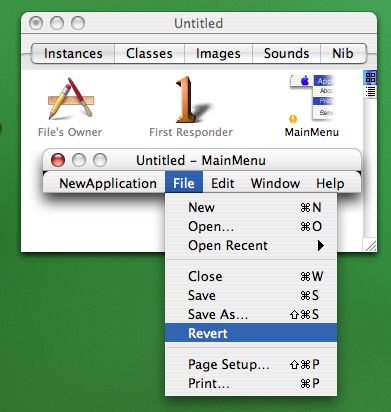
You then connect the menu item to one of the "actions" in the FirstResponder object. For example, I would connect the "Print" menu item to the FirstResponder action called "print:"
The FirstResponder is a placeholder object. Whichever interface widget currently has the focus is the FirstResponder. Behind it is the "responder chain" of enclosing objects, all the way up to the main application object itself. (Interface elements can also be assigned "delegates" so you don't have to subclass the widgets themselves. These are also part of the chain by proxy).
Actions assigned in IB correspond to method selectors. Since the "Print" menu item is bound to the "print:" action, the menu will will search up the responder chain for an object that implements a print method. If it finds one, that method becomes the target of the menu item, and the menu item is enabled. If there are no objects in the responder chain with a print method, the menu item disables itself.
Like I said, there are other ways of achieving more complex menu requirements. This simple way just makes it so much easier to do all the simple things, and gives you an enormous amount of standard menu functionality for free. Aside from Print (OS X uses Display PDF, so pretty much everything knows how to print itself), there's stuff like this:
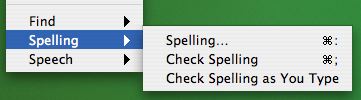
This is the standard bottom section of the Edit menu in OS X. The standard Cocoa text area (NSTextView) knows how to hook into the spell-check service, or how to speak its contents, or how to pop up a search window. And because of the way the menus work, the menu items just hook up to whatever text view is in focus automatically.
The practical result is that OS X applications are naturally rich. Every app with even the most trivial text-editing function has a spell-checker and a text-search feature, because you essentially get them for free, fully hooked up to the standard menu UI and keyboard shortcuts the moment you drag the NSTextView onto your window in IB.
